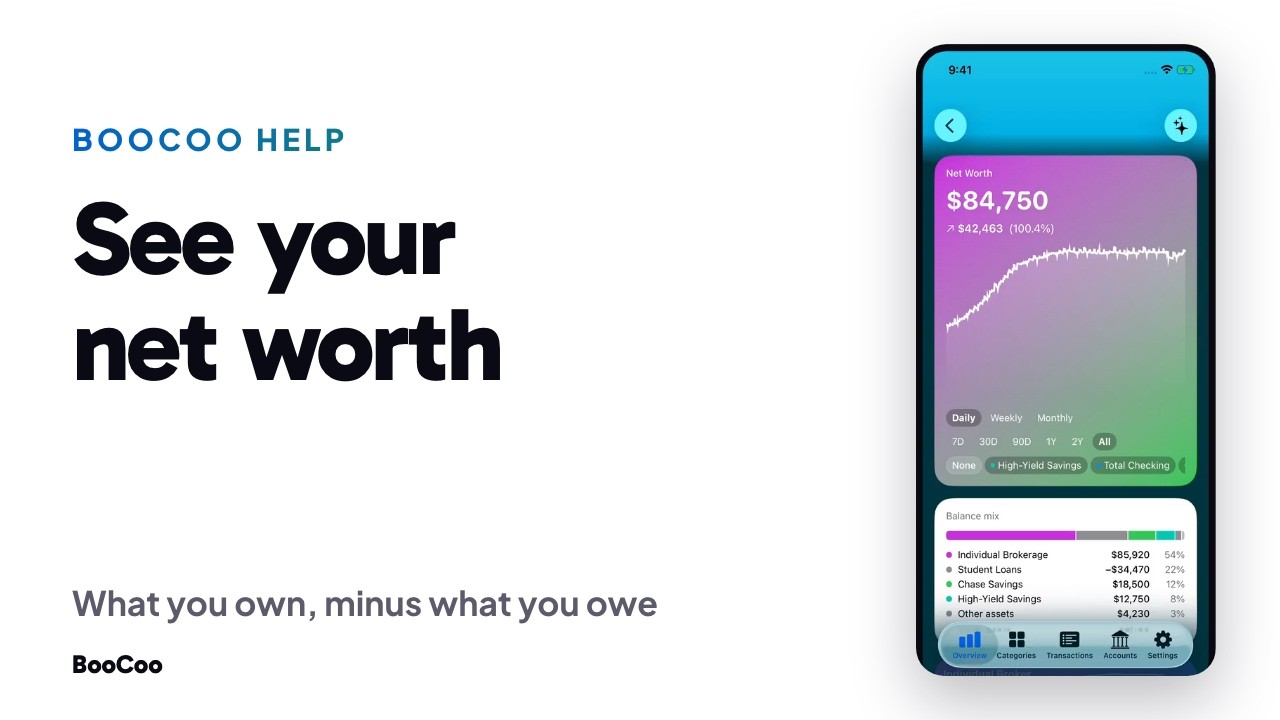
Your net worth is on the BooCoo Overview: what you own, minus what you owe. It updates on its own as your accounts sync. No spreadsheet. No homework.
Step by step
- Open the Overview. The Net Worth card shows the total and how it changed. The menu on the card picks the range it covers.
- Tap the card for the history. Pick a range from 7 days to all of it, and switch between daily, weekly and monthly points.
- Read the Balance mix. Under the chart, every account with its share of the total. Debts show as negative amounts.
- Open Assets or Debts. The two cards under Net Worth each open their own history, with every account that makes up the total.
- Open the Accounts tab. Every account behind those numbers, grouped by bank.
Where your data lives
Your financial data lives on your device and in your iCloud. Not ours. No email, no name, no password. BooCoo gets a random ID instead. We make money from subscriptions. There is nothing else to sell.
Common questions
What counts as an asset?
Every account that holds money: checking, savings and investments. You can also add something by hand, such as a house or a car, from the plus button on the Accounts tab.
Are investments included?
Yes, by their balance. BooCoo counts what an investment account is worth. It does not track individual holdings.
Do I need to update anything?
No. Connected accounts update on their own. Only things you added by hand change when you change them.
Video transcript
Your net worth is on the Overview. What you own, minus what you owe.
Tap it for the history. Pick a range, and see what it's made of.
Assets on their own. Every account that holds money.
Debts the same way. Every loan and card, and which way they're moving.
The Accounts tab lists every account behind those numbers.
BooCoo. Money Trends & Vibes.
About BooCoo
A finance app that tells you if you're okay. No budgets. No envelopes. No homework.